Installing firmware updates
Firmware updates are available free of charge and serve to enhance product improvement and also function extension.
You can update the Soundbar's firmware via a USB flash drive or using the Sennheiser Smart Control app.
Update via the Smart Control app
To update the firmware via the Smart Control app, the Soundbar must be connected to the Internet via WiFi or Ethernet (> Network connection via WiFi or Ethernet).
▷Start the Smart Control app on your smartphone.
▷The app provides information on available firmware updates and guides you through the installation process.
|
|
Automatic firmware updates are usually installed in the early morning hours (when the Soundbar is not in use). |

Update via a USB flash drive
Required USB flash drive:
•Memory size: minimum 1 GB recommended
•File system: FAT or NTFS
▷Download the update file with the file name “image.swu” from the website www.sennheiser.com/download and save the file on a USB flash drive.
▷Do not change the file name!
▷Switch the Soundbar on.
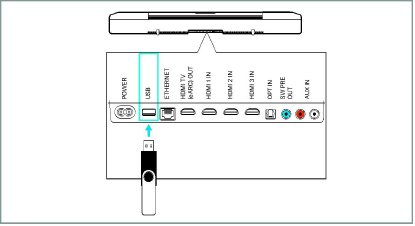
▷Connect the USB flash drive to the USB socket on the Soundbar.
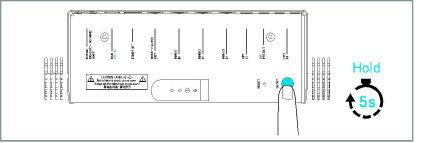
▷Press the SETUP button for 5 seconds.
The display shows “Updating” and the status LED pulses yellow.
The Soundbar restarts several times during the update. The process can take up to 8 minutes.