Pairing the earbuds with a Bluetooth device
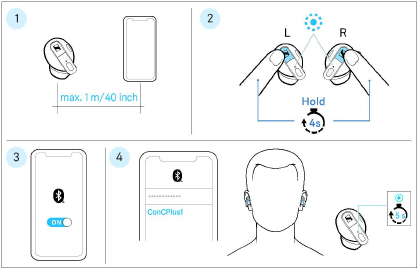
1.Take both earbuds out of the charging case (> Inserting the earbuds into the ears ). The distance between the earbuds and the Bluetooth device should not exceed 40"/1 m.
2.Simultaneously touch and hold the right and the left multi-purpose button for 4 seconds until you hear a melody.
The LEDs of the earbuds flash blue. The earbuds are in pairing mode.
3.Activate Bluetooth on your Bluetooth device.
4.Via the menu of your Bluetooth device, start the search for new Bluetooth devices.
All active Bluetooth devices in the proximity of your smartphone are displayed.
From the list of found Bluetooth devices, select “ConCPlus1”. If necessary, enter the default pin code “0000”.
If pairing was successful, you hear a melody and the LEDs of the earbuds light up blue for 5 seconds.
|
|
If no connection is established within 3 minutes, pairing mode is terminated and the earbuds switch to idle mode. If necessary, repeat the steps described above. If the earbuds are not connected to the Conversation Clear app or are not paired with any Bluetooth device (the pairing list is empty), pairing mode is permanently active. |
